


Over winter break, my 12-year-old called me over to look at her laptop.
She was studying for a quiz on a book she’d been reading. She had flashcards. And a podcast about the book — two AI hosts walking through the themes, the characters, the things that would probably show up on the test. She’d made both herself using NotebookLM. I didn’t even realize she knew about the product. Which is funny, because I helped build the Audio Overviews feature she was showing me.
It turns out NotebookLM is very popular at her school both among students and teachers. She had been using it all semester to build herself a study system. On her own. Which is pretty cool.
That’s the moment I understood how impactful NotebookLM can be.
When we were developing Audio Overviews at Google Labs, we knew it was a novel way to help people engage with their content. The immediate reaction when we shipped was delightful — people were surprised that such lifelike audio was possible. But the real impact turned out to be something we felt more than predicted: it reached people who felt they learned best by listening. People who’d been handed PDFs and book chapters their whole lives, formats they struggled to connect with.
That realization pushed the team further. Mind maps for content that benefits from clearly outlined structure. Slide decks for information that combines visual and written information. Videos for content that benefits from a deeper telling of the story or motion to bring ideas to life. Flashcards to help people test themselves and secure knowledge.
Builder’s note: This isn’t a feature roadmap built around “what’s technically cool.” Each output format is a bet that the same information, delivered differently, becomes useful to a different person or within another context. Google’s mission is to organize the world’s information and make it accessible and useful. NotebookLM is what “useful” looks like when you take it seriously.
What NotebookLM actually is
Most people I talk to think of it as a chatbot for their files. Upload a PDF, ask it questions. That’s not wrong, but it’s missing most of what makes it interesting.
NotebookLM is a research and learning environment grounded entirely in sources you choose. You bring the material; the system stays inside it. Every answer comes with citations back to your specific sources, which massively reduces hallucinations. That constraint is the whole point.
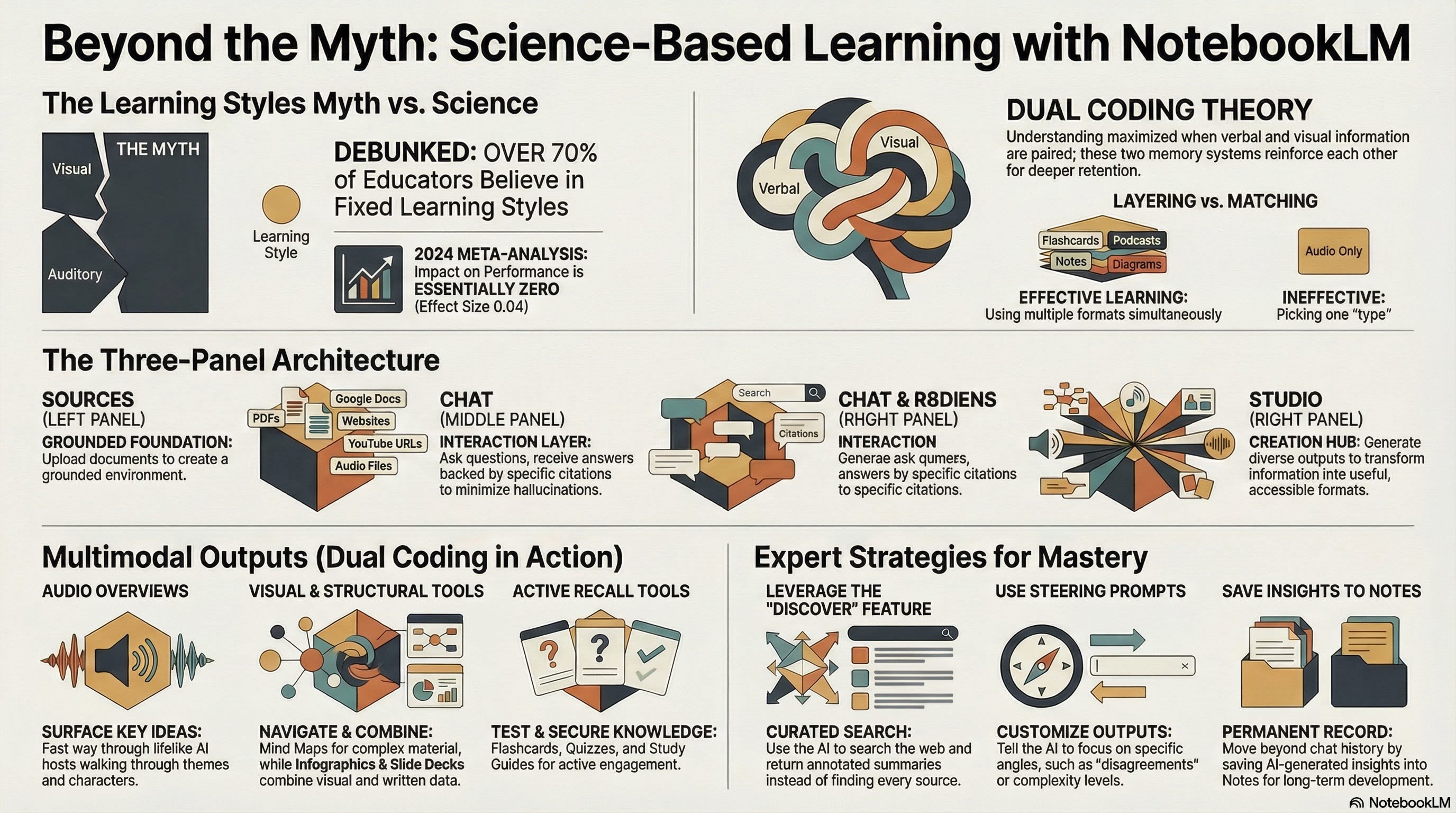
The interface has three panels. Sources on the left: everything you’ve uploaded or linked. Chat in the middle: ask questions, get answers, save the good ones as notes. Studio on the right: where you generate outputs to make your information more useful.
You can put in: PDFs, Google Docs, websites, YouTube URLs, audio files, raw text, even your own notes. I find it helpful to share voice recordings of my own disorganized thoughts about the topic. The system does the organization automatically, which feels like magic.
What you get out: Audio Overviews, Video Overviews (in three formats, including a Cinematic mode that is genuinely stunning), Mind Maps, Infographics, Slide Decks, Flashcards, Quizzes, Briefing Documents, Study Guides, FAQs. All grounded in your sources, all completely different ways into the same material.
The learning styles myth
Before I get into how to use NotebookLM, I want to flag something.
The obvious framing for a tool like NotebookLM is: figure out your learning style, pick the matching output format. Visual learner? Mind map. Audio learner? Podcast. You get the idea.
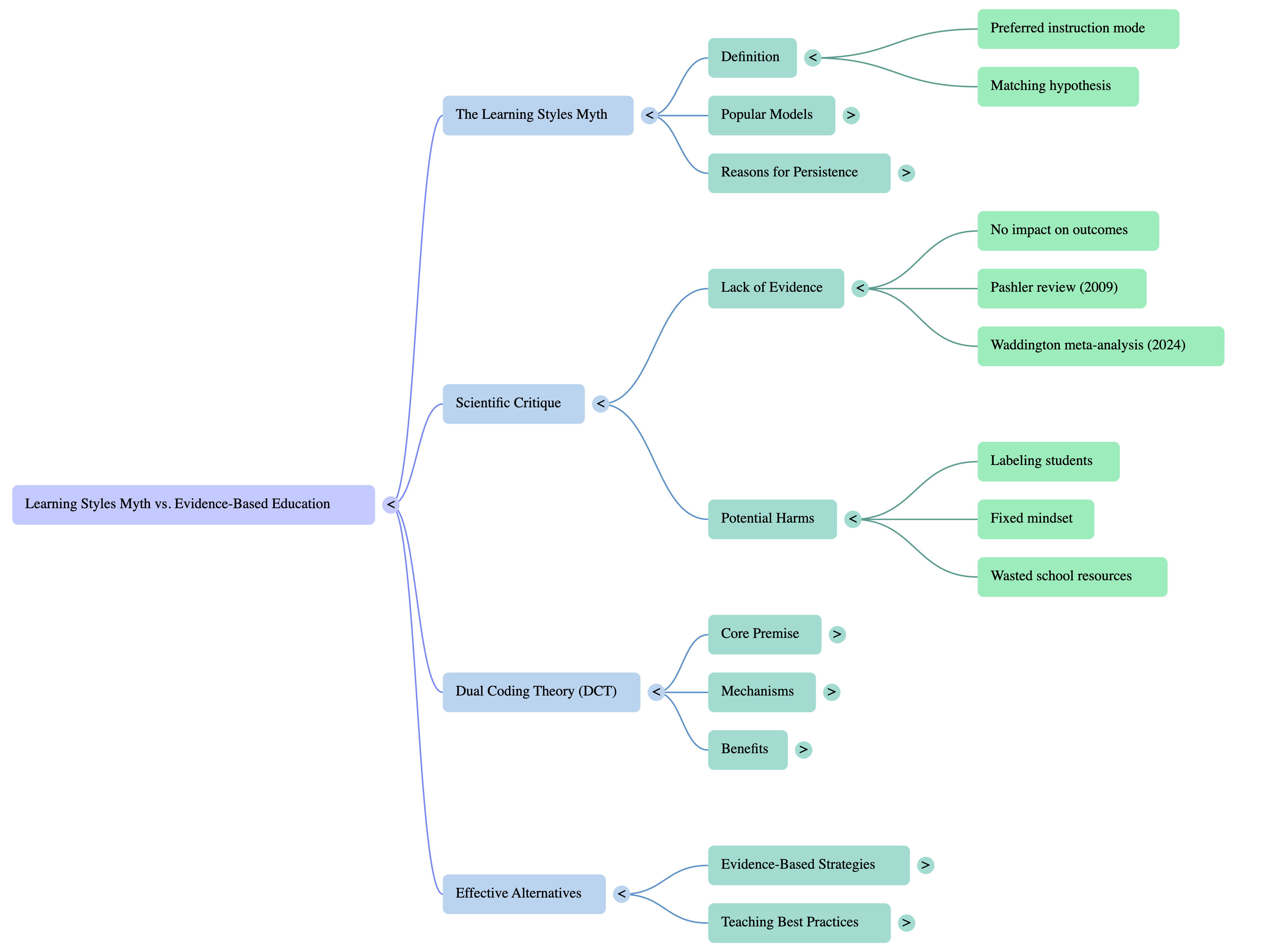
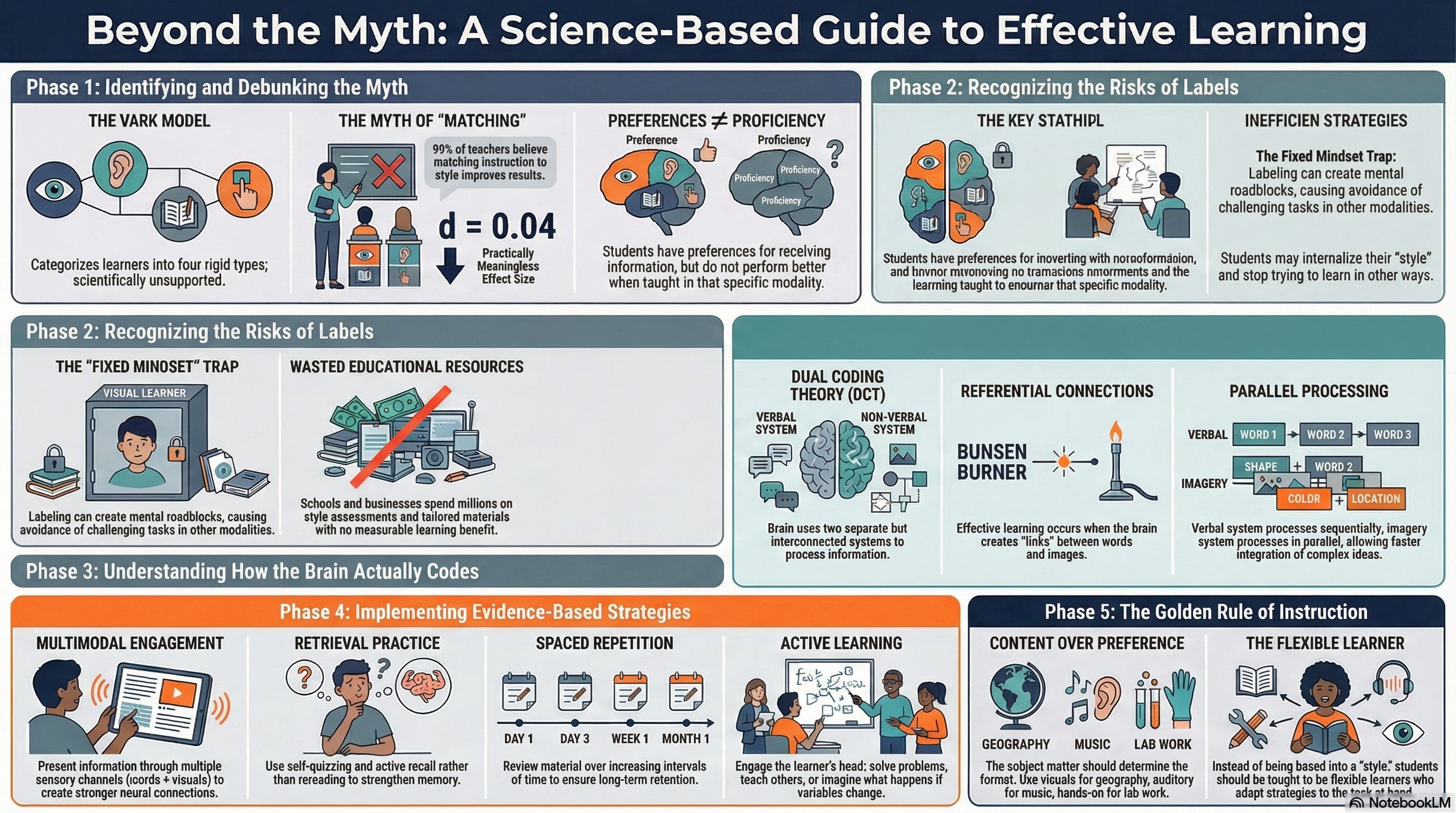
That framing is wrong. Not intuitively wrong — it feels right, which is why over 70% of educators still believe it. Scientifically wrong. The research on “learning styles” as fixed, matchable preferences has been thoroughly debunked. A 2024 meta-analysis across more than 1,700 students found that matching teaching style to learning style had no meaningful impact on performance. The effect size is 0.04. Essentially zero.
What the research does support is something more interesting: combining formats builds better understanding than any single format alone. This is called Dual Coding Theory. When you pair verbal information with visual information, the two memory systems reinforce each other. You retain more. You understand deeper.
My daughter didn’t pick her learning style. She made flashcards and a podcast. Both. That’s Dual Coding in action, figured out by a 12-year-old without anyone explaining the theory to her.
So the tips below aren’t about finding your type. They’re about using the tool the way the science suggests learning actually works.
Six tips for getting started
1. Start with something you actually need to understand
Don’t test NotebookLM with a random PDF just to see what happens. Pick something you’re genuinely trying to learn — a topic at work, a book you’re reading, a subject your kid is studying for a test. The tool works best when you have a real question. Generic inputs produce generic outputs. Here are a few topics already set up as notebooks if you want a running start:
2. Add more sources than you think you need — and let NotebookLM find them
One document produces one-document results. A YouTube lecture, two articles, and a PDF on the same topic produces something much richer — the AI can find connections and disagreements across sources that you wouldn’t catch reading them separately.
Here’s the part most people miss: you don’t have to find the sources yourself. Hit the Discover button in the Sources panel, describe what you’re trying to learn, and NotebookLM searches the web and returns curated sources with annotated summaries. Add the ones that look useful with one click. That’s how I built the notebook backing the research in this article — I described the topic, let it do the research, and had a solid set of sources in a few minutes.
[🔗 You can explore the full notebook here: The Learning Styles Myth]
3. Try the Audio Overview first
It’s the fastest way to understand what NotebookLM pulled out as the key ideas. Even if you don’t normally listen to things, run it once before generating anything else. It surfaces connections and frames the material in a way that makes every subsequent output more useful.
[🎧 Listen: Audio Overview — The Learning Styles Myth]
4. Don’t stop at one format
This is the tip that changes how you use the tool. Generate the Audio Overview. Then generate the Mind Map. If the content is complex, try the Cinematic Video. The learning styles research says picking your “type” doesn’t help. The Dual Coding research says layering formats does. Use both.
[🗺️ Mind Map — Key concepts from the research]
[📊 Infographic — Beyond the Myth: A Science-Based Guide]
[📽️ Video Overview — Cinematic Video: The Learning Styles Myth]
[📑 Slide Deck — Download the full presentation]

5. Use the Steering Prompt
Every output in the Studio panel has a customization option before you generate. You can tell NotebookLM to focus on specific sources, approach the topic from a particular angle, or explain things at a certain level. Most people skip this and wonder why the output feels generic. “Focus on the disagreements between these sources” produces a completely different Audio Overview than the default. Try it.
6. Save the good stuff to Notes
When the chat surfaces an insight worth keeping, save it. Notes live inside your notebook alongside the sources. Your own thinking and the AI’s synthesis sit in the same place. Over time, the notes become a record of how your understanding of a topic developed — which is useful in a way that a chat history never is.
The thing my daughter understood
She didn’t ask what kind of learner she was. She made flashcards to test herself and a podcast to listen to while she studied. She layered formats because that’s what felt right, and it turns out the science agrees with her instincts.
NotebookLM is good at a lot of things. The Cinematic Video is genuinely amazing — watch the embed above if you haven’t yet. The Mind Map makes complex source material navigable in a way that’s hard to describe until you’ve dragged a branch around and watched the rest reorganize.
But none of that is the point. The point is that the same information can be made useful in a dozen different ways, and most of us have been stuck with one or two of them our whole lives.
My daughter had a quiz to pass. She figured out how to prepare for it. You can do the same thing with whatever’s on your plate. Big sales call? Load up the client’s annual reports. Job interview? Drop in the job description and let Discover find you prep material. Presentation next week? Paste in your notes, record a voice brain dump, and watch it turn into slides. Even if it only breaks the writer’s block, that’s worth it.
So, what are you trying to understand right now? Have you tried more than one format yet? I’m curious what you’re hoping to learn and what works for you!
— T